
Artificial intelligence is not a magic wand for designers and content creators. It is merely a high-capacity engine that works with probabilities. Most users try to manage this engine with random commands. However, this method usually yields mediocre results. To achieve professional, sustainable, and high-quality outputs, you need the discipline of prompt engineering, not luck.
This discipline elevates artificial intelligence from being a bot for casual chat. It transforms it into a goal-oriented and analytical business partner. Most people think writing a prompt is just “asking a question.” However, this process is like building a software architecture. To manage the model correctly, you must first understand how it thinks, and then manage this thinking structure by dividing it into layers.
The 3-Layer Prompt Hierarchy
A professional prompt engineer constructs their communication with AI not on a single plane, but in a hierarchical pyramid structure. In this structure, a change made in the upper layer directly affects all the lower layers. To ensure the system works healthily, you need to recognize these three layers:
Top Layer
Master Prompt
The area where you change the model’s “default” factory settings. A rule you add here (e.g., “Always use an academic tone”) becomes valid in all the chats you open. This layer is the digital identity of the AI.
Middle Layer
System Prompt
An area customized for tasks requiring specific expertise (e.g., SEO Analysis or UX Writing). It only activates while performing that specific task.
Bottom Layer
Standard Prompt
The one-off commands you need at that moment. Daily operational tasks like writing an email, describing an image, or finding a code error take place on this level.
To manage this architecture, we must first learn the language the AI understands: the formula.
1. Advanced Prompt Formula: Packaging Data Semantically
Writing a good prompt does not simply mean asking a question. This process is more like writing code. Prompt engineering is the art of semantically packaging data and presenting it to the model. You should avoid giving the model fuzzy instructions. Instead, you need to provide clear coordinates. As stated in Google’s “Prompting Essentials” guide, a successful output only emerges when you clearly define the task, context, and references. The components that transform a standard sentence into a professional command set are:
1.1. Persona Assignment
Determine which information pool the model will scan. Give it an identity. For example, instead of saying “Write a blog post,” say “You are an award-winning UX writer.” This small change increases the depth of the output. Role assignment directly alters the model’s word choices and analytical capabilities.
1.2. Context and Goal
This includes “why” the task is being done and its background. In design, the more detailed a brief is, the more accurate the result. The model needs to know who the content is for (target audience), on which platform it will be shared, and for what purpose (conversion, education, entertainment). Context is the strongest anchor that minimizes the risk of hallucination.
1.3. Multimodal Prompting
You must go beyond text-based commands. Modern models have Multimodal Prompting capabilities. That is, you can provide the model with not just text, but also image, audio, or video inputs. For example, when having a website design analyzed, upload a screenshot instead of describing the site. Give the model the command: “Analyze the typography hierarchy in this image and find the errors.” This method clarifies the context more than words ever could.
1.4. Negative Constraints
AI models generally understand “what they should do.” However, if you don’t clarify “what they should NOT do,” they fall into clichés. Negative commands are vital in the prompt engineering process. For instance, set strict prohibitions like “Never use the passive voice” or “Do not make a dictionary definition in the introduction paragraph.”
1.5. Output Format
How the information is presented is as important as the content itself. Don’t leave the model free. Request data as a table, JSON format, or a Markdown list. This increases the processability of the data you receive.
Quality Prompt Writing Formula:
[Role/Expertise] + [Context and Purpose] + [Multimodal Input (If any)] + [Task Detail] + [Negative Constraints] + [Desired Format]
By using this formula every time, you direct the model’s processing capacity correctly. Thus, you minimize the margin of error.
2. Master Prompt: Building Digital Memory and Identity
Writing the same commands repeatedly is a huge waste of time. The Master Prompt solves this problem at its root. This structure is like the AI’s permanent “memory.” Professional prompt engineering doesn’t just cover instantaneous commands; it also involves changing the model’s “factory settings.” The Master Prompt ensures the model starts every chat as the expert you have defined.
2.1. Long Context Window and Memory
Advanced models (such as Gemini 1.5 Pro) have a massive “Context Window” of up to 1 million tokens. Take advantage of this capacity when creating your Master Prompt. You can upload not just a short biography, but also the 10 best articles you’ve written in the past, your company’s Brand Book, or your code library to this memory. Thus, the model optimizes every response according to your style and historical data. This feature transforms the model from a general assistant into an employee with institutional memory.
2.2. Technical Depth: Temperature
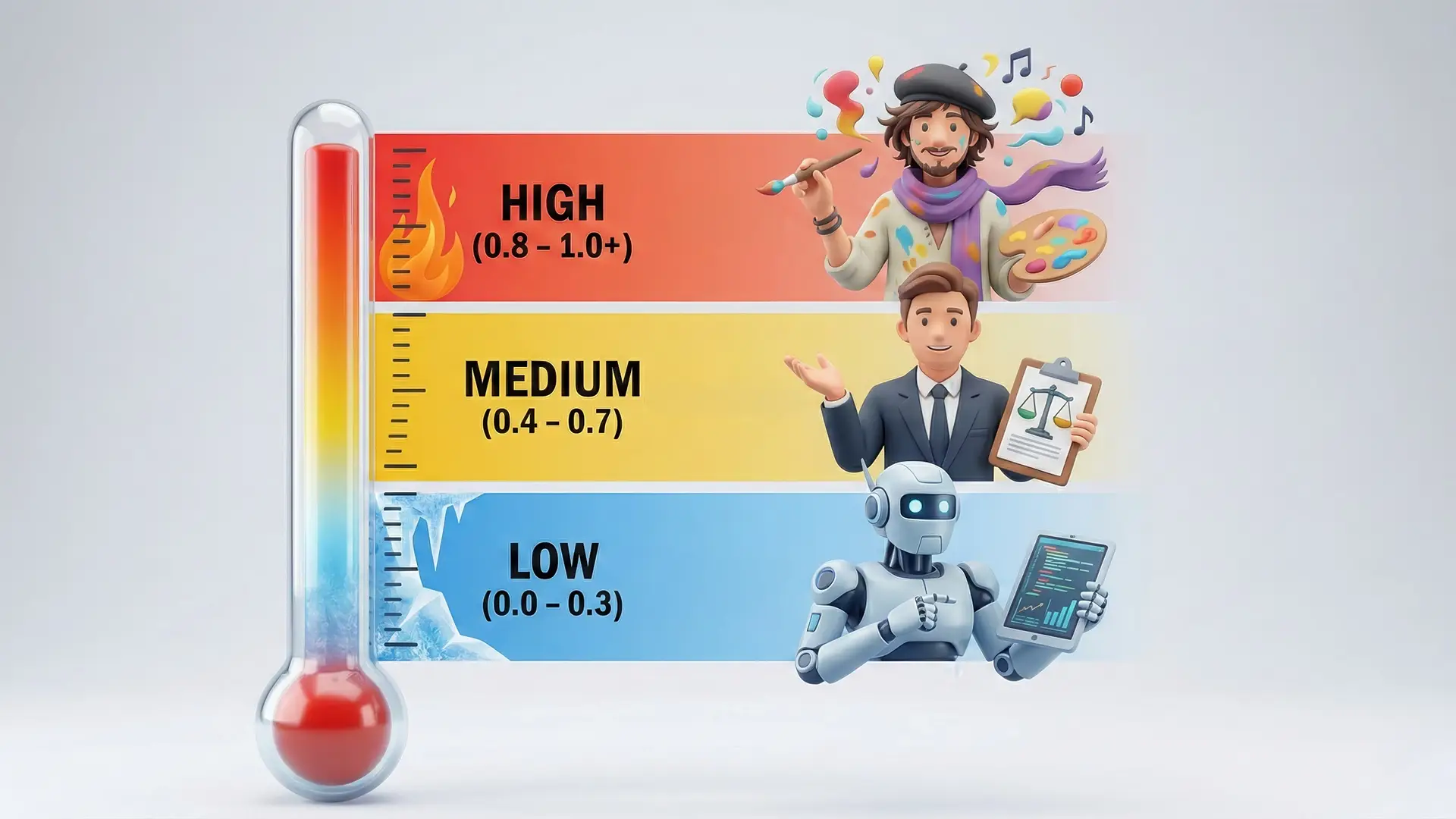
A Master Prompt is not just made of text; you must also manage the model’s parametric settings. The most important of these is Temperature, or the creativity coefficient. If you want a creative text, keep this value between 0.8 – 1.0. However, if you want a technical code analysis or a data report, lower the value to 0.2 to prevent hallucination. In short, these settings, which determine how “consistent” or how “creative” the outputs will be, are often invisible to standard users. In addition to panels accessible to professional developers, you can change these settings in your conversation using a series of prompts.
| Low Temperature (0.0 – 0.3) | The model acts like a “Robot.” It never jokes or adds personal interpretation; it focuses solely on data. Coding, data analysis, or financial reporting. |
| Medium Temperature (0.4 – 0.7) | The model acts like a “Consultant.” It is both logical and fluent. Standard ChatGPT and Gemini settings are usually in this range. |
| High Temperature (0.8 – 1.0+) | The model acts like an “Artist.” It makes unexpected connections and speaks poetically. Brainstorming and creative writing, but the risk of “hallucination” increases. |
Common language models like Gemini and ChatGPT do not have a button to adjust temperature. However, you can manipulate the model’s behavior by adding the following note to the end of your Master Prompt or instant command:
“Act as if you are at the ‘Temperature 0.2’ setting when responding. Be highly consistent, deterministic, free of interpretation, and based only on data.”
If you are a developer or need to perform these controls manually for professional work, you can use developer panels like Google AI Studio or OpenAI Playground. In these panels, you can adjust the model’s creativity coefficient with millimeter precision using the “Temperature” and “Top-P” (word pool diversity) sliders in the right-hand menu.
Creating your own Master Prompt can be difficult. However, you can have the AI do it for you. Use the following “Meta-Prompt” to create your own professional settings:
Master Prompt Creator (Copy/Paste):
You are a 'System Prompt Architect' specialized in Large Language Models (LLM) and the Google Prompting Essentials methodology. Your goal is to build a high-technical-depth Master Prompt that will fundamentally change the model's behavior for me to use in the ChatGPT 'Custom Instructions' or Gemini 'System Instructions' area.

To perform this task, you must conduct a 2-stage process with me:

STAGE 1: IN-DEPTH INTERVIEW
Ask me these 5 strategic questions for me to answer at once:

Expertise and Mental Models: What professional discipline do you have, and from what framework (e.g., Design Thinking, First Principles, Pareto Principle) do you want me to analyze things?

Temperature Simulation: What kind of behavior do you expect in my outputs? (A: Deterministic, error-free, and robotic - Low Temperature / B: Creative, analogical, and surprising - High Temperature)

Negative Constraints: What are the mistakes I should never make, use, or fall into? (e.g., 'Never summarize', 'Do not use passive voice', 'Do not fall into the intro-body-conclusion cliché', etc.)

Cognitive Load and Format: How should I structure the responses? (Table, JSON, Markdown, Code Block, Step-by-Step Chain of Thought, etc.)

Reference Sources: Are there specific methodologies or sources you want me to prioritize in my knowledge pool?

STAGE 2: MASTER PROMPT CONSTRUCTION
After I provide the answers; analyze this data and write the final text in the following structure, in English (or my preferred language), which I can copy and paste. The text should consist of these two main parts:

PART 1: ROLE & CONTEXT: Define who I am and what expertise hat (Persona) you will wear.

PART 2: CRITICAL INSTRUCTIONS:

Tone & Style: Language rules simulating the temperature setting I specified.

Chain of Thought: Directives on how to break down complex tasks step-by-step.

Negative Constraints: A list of things never to be done (This part should be very strict).

Output Format: Desired visual hierarchy rules.

If you are ready, ask the questions.
Where to Add?
- ChatGPT: Paste into the Customize ChatGPT > Custom Instructions area.
- Gemini: Process into the profile or memory section in the Settings menu.
3. System Prompt and Agents
If the Master Prompt is a general “Constitution,” the System Prompt consists of “Ministries” assigned for specific tasks. These structures, called “GPTs” in the OpenAI ecosystem and “Gems” in the Google Gemini ecosystem, are designed for repetitive tasks. While the Master Prompt sets the general rules, the System Prompt focuses on a specific task.
For example, you can set up an agent that only performs “SEO Analysis” or codes “SVG Icons.” This agent does not know about other topics and focuses only on the task. When designing a system prompt, upload reference files specific to that task to the system. This is of critical importance, especially in processes requiring consistency like information design.
Starting Strategy and Permission Management: Apply the “Small Steps Strategy” when using agents. Do not entrust the entire system to your agent on the first day. Start with low-risk tasks (e.g., preparing draft emails) and supervise the output. Also, “Permission Management” is a critical security issue. If the agent’s task is only to summarize emails, do not give it permission to access your entire Google Drive or code base. Limit the permissions to the scope of the task.
Use this meta-prompt to set up your own specialized agent:
System Prompt (Agent) Creator (Copy/Paste):
I want to create a specialized AI Agent (GPT/Gem) to automate a specific task.

Ask me what specific problem this agent will solve and its target audience.

After receiving my answer; write a highly detailed System Prompt based on the Chain of Thought principle that minimizes the risk of making mistakes, which I should paste into the 'Instructions' box of this agent.
This way, everyone in your team gets outputs of the same standard. Your workflow speeds up, and the error rate decreases dramatically.
4. Prompt Usage Technique: Chaining and Loading
Even if you write the best prompt, you won’t get results if you load it into the model incorrectly. AI models have an “attention mechanism.” If you give the model a very long and complex text at once, it might forget or skip some instructions. This is where the most effective of prompt engineering techniques comes into play: Chaining.
4.1. What is Chaining?
It is breaking down a complex task into sequential logical steps instead of a single massive prompt. We can explain this with a “Puzzle Metaphor.” When starting a puzzle, you don’t combine all the pieces randomly. First, you find the corner pieces (Analysis), then you form the edges (Strategy), and finally, you fill in the middle part (Implementation). AI processes are like this; you cannot see the whole without placing the first piece.
4.2. Advanced Level: Tree of Thoughts
Another technique highlighted in Google Prompting Essentials is the “Tree of Thoughts” approach. In addition to the chaining technique, you can ask the model not just to follow a single path, but to simulate possible different scenarios. For example: “Produce 3 different user journey alternatives for this persona and choose the best one by comparing the pros/cons of each.” This method increases the model’s analytical depth.
4.3. Example Scenario: UX/UI Design for a Mobile App
Suppose you are designing a new finance app. If you say “Draw the app screens for me” with a single prompt, the AI will give you a superficial answer. Instead, use the chaining technique:
| Step 1 Analysis | Create 3 different User Personas suitable for the target audience of ‘Gen Z who are afraid to invest’ for a new generation finance app. |
| Step 2 Strategic Formulation | Based on the ‘Student Ahmet’ character from these personas, develop a step-by-step User Journey Map for the app’s onboarding process. |
| Step 3 Building the Architecture | Based on the touchpoints in this journey map, create the app’s Information Architecture tree and the list of necessary screens. |
In this method, the screen list in step 3 becomes highly consistent and goal-oriented because it is based on the “Student Ahmet” analysis in step 1.
4.3. Prompt Loading Protocol: How to Enter Data into AI?
Follow these steps when pasting your prompts into the model:
- Give the Context First: Upload the reference text or data first. Write to the model: “I will give you a dataset. Just say ‘I read it’ and wait. Do not analyze.”
- Proceed Step by Step: Give the first task after the model says “I read it.”
- Stop and Check: If there is an error in the intermediate outputs, correct it immediately. Do not continue a chain that has gone wrong until the end.
- Iterate: If the output is good, strengthen the context by saying “Great, now move on to the next step while maintaining this tone.”
5. Common Mistakes in Prompt Engineering
Even if you have set up a perfect system, simple mistakes made in daily use can lower the quality of the output. Do not fall into these traps when applying prompt engineering principles:
- Politeness Overhead: Do not constantly use expressions like “Please” or “If you could” with the model. These words waste unnecessary data (tokens) and can distract the model’s focus. Remember you are talking to a machine; clear imperatives always yield better results.
- Cognitive Overload: Do not ask for 5 different unrelated tasks at once within a single prompt. Break complex tasks into pieces using the Chaining method.
- Insufficient Context and Lack of Iteration: The first output is never the final output. Instead of subjective expressions like “Make this more professional,” give measurable commands. If the result is bad, revise the prompt (Iterate). The final step in Google’s 5-step framework (Task, Context, References, Evaluate, Iterate)—iteration—is the path to mastery.
- Risk Management and Hallucination: At high “Temperature” settings, the model’s risk of hallucination (producing non-factual information) increases. Especially if you are doing data analysis, see AI as a “co-pilot,” not the captain. Always verify outputs.
- Lack of Negative Prompts: Not specifying what you don’t want causes the model to stray into the most probable (usually the most cliché) path. Be sure to specify forbidden words.
Conclusion: Taking the Director’s Chair
Prompt engineering is not the skill of stringing words together. It is an art of intention management. Build your identity with the Master Prompt. Create your tools with System Prompts. Optimize your language with advanced formulas. When you take these steps, artificial intelligence stops being an assistant that thinks for you. It becomes an amplifier that multiplies your thoughts.
Remember, the model’s intelligence is limited by the quality of the question you ask it. Be the one who manages technology, not the one who follows it.
If you liked this article, you can check out my post titled AI Automation: Build Your Own Newsletter.